Sarathi Parivahan Sewa Portal – Check RC Status, DL Status, Vehicle Details & Pay eChallan Online
India has over 41 crore registered vehicles on the road. Every one of them is tied to documents, fees, and government records. At some point, every owner needs to manage these.
Parivahan Sewa is India’s official digital transport platform. The Ministry of Road Transport and Highways (MoRTH) launched it. The National Informatics Centre (NIC) built and maintains the system.
The platform runs on two core systems. Sarathi handles all driving licence services. VAHAN 4.0 manages vehicle registration, RC, and tax records. It also includes the e-Challan portal and the mParivahan mobile app. Together, they connect over 1,300 Regional Transport Offices (RTOs) across India under one digital roof.

In practical terms, you can do a lot from parivahan.gov.in. Apply for a Learner’s Licence or a Permanent Driving Licence. You can check your RC status, look up RTO vehicle information for any registration number, pay a traffic challan, download your PUCC, update vehicle ownership, or track any application — all online. The portal currently offers 120+ citizen services without needing an RTO visit for most tasks.
There are important 2026 updates too. Online appointment booking became mandatory at all RTOs from July 1, 2026. Faceless DL renewal is now live across all states.
Your digital DL and RC are legally valid documents. Store them on DigiLocker or the mParivahan app. This is backed by an amendment to the Motor Vehicles Act. No physical card is needed at a traffic checkpoint.
This guide covers every major Parivahan Sewa service clearly, with direct portal links, step-by-step processes, official fee structures, and 2026 updates — so you know exactly where to go and what to do.
Quick Summary: Parivahan Sewa at a Glance
| Detail | Information |
|---|---|
| Portal Name | Parivahan Sewa |
| Launched Under | Digital India initiative |
| Managed By | Ministry of Road Transport and Highways (MoRTH) |
| Built & Maintained By | National Informatics Centre (NIC) |
| Official Website | parivahan.gov.in |
| Core Systems | Sarathi (driving licence) + VAHAN 4.0 (vehicle registration) |
| States/UTs Covered | 36 |
| RTOs Connected | 1,300+ |
| Mobile App | mParivahan |
| Key Services | DL apply/renew, RC status, e-Challan payment, permits, PUCC |
| Legal Validity | Valid under CMVR Rule 139 (amended 2018) |
What is Parivahan Sewa?
Parivahan Sewa is a digital initiative launched by the Ministry of Road Transport and Highways (MoRTH), Government of India, to provide seamless access to vehicle- and driving licence-related services online across all states and union territories — serving as the home Parivahan Sewa Ministry of Road Transport platform for citizens nationwide. The platform’s core aim is to make transport services simpler, faster, and more transparent — eliminating unnecessary paperwork and reducing dependence on physical RTO visits.
Key Objectives of Parivahan Sewa
- Streamline processes such as vehicle registration, driving licence applications, and permit issuance.
- Minimize manual intervention by enabling fully digital workflows and online verification.
- Integrate transport data across states and central databases for unified monitoring and governance.
- Save citizens valuable time and money while improving administrative efficiency.
For vehicle owners, drivers, transport operators, and fleet managers, Parivahan Sewa offers a smarter, hassle-free way to manage all transport-related activities — from applying for licences to tracking application status — all in one place
Licence Related Services
Access learner, driving licence, appointment, training and status services from one place through official digital transport platforms.
Learner & Driving Licence
Apply, renew, update or download licence-related documents through the official Sarathi portal.
Driving School Services
Access registration and management services for approved driving training institutes.
Test & Appointment Booking
Schedule, reschedule or manage learner and driving test appointments online.
Additional Services
Explore correction requests, document updates and other licence-related facilities.
Application Status
Track application progress and view the latest updates in real time.
Sarathi Dashboard
Manage applications, appointments and licence services through a single dashboard.
Vehicle Related Services
Manage registration, permits, vehicle records, payments and transport-related services through connected digital systems.
Vehicle Registration
Access registration, ownership updates and essential vehicle management services.
Fancy Number Services
Browse and apply for available premium registration numbers online.
National Permit
Apply for and manage permit-related services for eligible transport vehicles.
Other Vehicle Services
Access transfer, NOC, address update and additional vehicle-related facilities.
e-Challan Services
Check pending challans, review details and complete payments securely online.
VAHAN Dashboard
View vehicle-related records and manage services through the VAHAN platform.
Top Features of Parivahan Sewa Portal
Parivahan Sewa is designed to make transport services easy, fast, and completely online. It allows users to manage vehicle and driving licence services from one place without wasting time in long queues or paperwork. The platform is simple to use, secure, and available across all states in India.
- Access all services like RC, Driving Licence, and challan in one place
- Apply online, upload documents, and make secure payments without visiting the RTO
- Track your application status anytime with real-time updates
- Use digital RC and Driving Licence on your mobile, legally accepted everywhere
- Get instant details about vehicle registration, licence status, and fines
- Book appointments online for driving tests or verification
- Easy and beginner-friendly interface for smooth user experience
- Transparent system that reduces delays and improves trust
Benefits of Using Parivahan Sewa
Using this portal offers multiple advantages for citizens, government and transport stakeholders:
- Time saving – No need to queue at RTO offices; services available online 24/7.
- Convenience – Accessible from anywhere; apply, pay, track online.
- Transparency – Status updates, receipts, digital records reduce ambiguity.
- Nationwide access & uniformity – Many states use the same platform so procedures are consistent.
- Reduced middlemen/fraud – Digital workflows leave lesser room for corrupt intermediaries.
Especially for users in remote or smaller towns, Parivahan Sewa brings high-quality public service directly.
Key Services Offered by Parivahan Sewa
Parivahan Sewa offers a single digital platform for all transport-related needs, including driving licences, vehicle registration, permits, tax payments, and more — making it easy for citizens to manage everything online without visiting the RTO. Here are the core offerings:
1. Vehicle Registration & Ownership Management
Through the VAHAN system, users can manage every aspect of vehicle registration online. You can:
- Register a new or used vehicle seamlessly.
- Renew, cancel, or transfer vehicle ownership.
- Request a duplicate Registration Certificate (RC) in case of loss or damage.
- Update details like address or hypothecation linked to your vehicle.
This digital integration helps save time and ensures transparency in the entire registration process.
2. Driving Licence Application & Renewal
Using the SARATHI platform under Parivahan Sewa, citizens can conveniently:
- Apply for a Learner’s or Permanent Driving Licence.
- Renew or update existing licences.
- Request a duplicate DL or make address corrections.
- Track the real-time status of applications and test appointments.
This makes the licensing process smoother, faster, and fully paperless.
3. Fitness Certificate & Permit Management
For commercial vehicle owners, Parivahan Sewa simplifies compliance with transport laws by offering:
- Fitness certificate bookings and renewals.
- Permit issuance and renewals for state, national, and tourist operations.
- Dealer and vehicle authorization services for seamless transport regulation.
These features ensure that vehicles remain roadworthy and legally compliant.
4. e-Challan & Digital Payment Services
Avoid long queues and make payments securely online:
- Check and pay traffic challans issued anywhere in India.
- View challan history and payment receipts anytime.
- Ensure complete transparency and accountability in traffic fine management.
The system integrates with RTOs and traffic authorities, offering a one-stop solution for digital compliance.
5. Other Value-Added Services
Parivahan Sewa goes beyond basic transport management with several additional features, including:
- Online fancy number reservation and bidding.
- Quick tax and fee payments for all vehicle categories.
- Loan hypothecation updates and termination.
- PUCC (Pollution Under Control Certificate) verification and renewal.
These services collectively make Parivahan Sewa a complete digital transport ecosystem for both individuals and businesses.
Manage Your Driving Licence Digitally with Sarathi Portal
Manage all your driving licence needs easily through the SARATHI portal on Parivahan Sewa (sarathi.parivahan.gov.in) — your one-stop digital platform for all licence-related services. Whether you’re applying for a new licence, renewing an existing one, or updating your details, everything can now be done online without visiting the RTO.
Getting Started
- Apply for a Learner’s Licence (LL)
- Apply for a Permanent Driving Licence (DL)
- Schedule or reschedule your driving test appointment online
Keeping Your Licence Updated
- Renew your DL before it expires
- Request a duplicate licence if your original one is lost, stolen, or damaged
- Update your information (such as address or name change) easily online
Making It Easier for You
- Track your DL application status anytime, anywhere
- Download or print your e-Driving Licence instantly
- Get digital receipts and updates directly on your dashboard
Types of Driving Licences: Learner’s & Permanent
Learner’s Licence (LL) – Your First Step
A temporary permit that lets you practice driving under supervision.
- Must drive with an experienced licence holder.
- “L” sign is mandatory while learning.
- Valid for 6 months (renewable as per state rules).
Permanent Driving Licence (DL) – Full Driving Rights
Issued once you pass the driving test after your learning period.
- Allows you to drive independently for approved vehicle classes.
- Includes renewal and update options through Parivahan Sewa.
- Valid across India as an official proof of driving authorisation.
Check If You’re Eligible
| Requirement | Details |
|---|---|
| Age Requirement | – 16 years: Eligible for motorcycles without gears. – 18 years: For geared motorcycles and private cars. – 20 years: For commercial or transport vehicles. |
| Health & Fitness | You must be physically and mentally fit to operate a vehicle safely, as per transport authority rules. |
| Traffic Awareness | Applicants should have basic knowledge of road safety signs and traffic laws before applying. |
Required Documents
| Document Type | Accepted Proofs | Notes |
|---|---|---|
| Identity Proof | Aadhaar Card, Passport, Voter ID | Must be valid and up to date. |
| Address Proof | Aadhaar Card, Passport, Voter ID, or a recent Utility Bill (within 3 months) | Ensure your current address matches your application. |
| Age Proof | Birth Certificate, 10th-grade Mark Sheet, or Passport | Any one of these documents is sufficient. |
| Photographs | Passport-size photos | Follow the specified background and size requirements. |
| Learner’s Licence | Valid Learner’s Licence (LL) | Mandatory before applying for a permanent driving licence. |
| Fee Payment | Online payment via Parivahan Sewa | Check the portal for the latest fee updates. |
How to Apply for a Driving Licence (Step-by-Step Guide)
Applying for a driving licence through the Parivahan Sewa portal is simple, quick, and fully online. Follow these easy steps to complete your application without visiting the RTO in person.
Step 1: Visit the Official Website
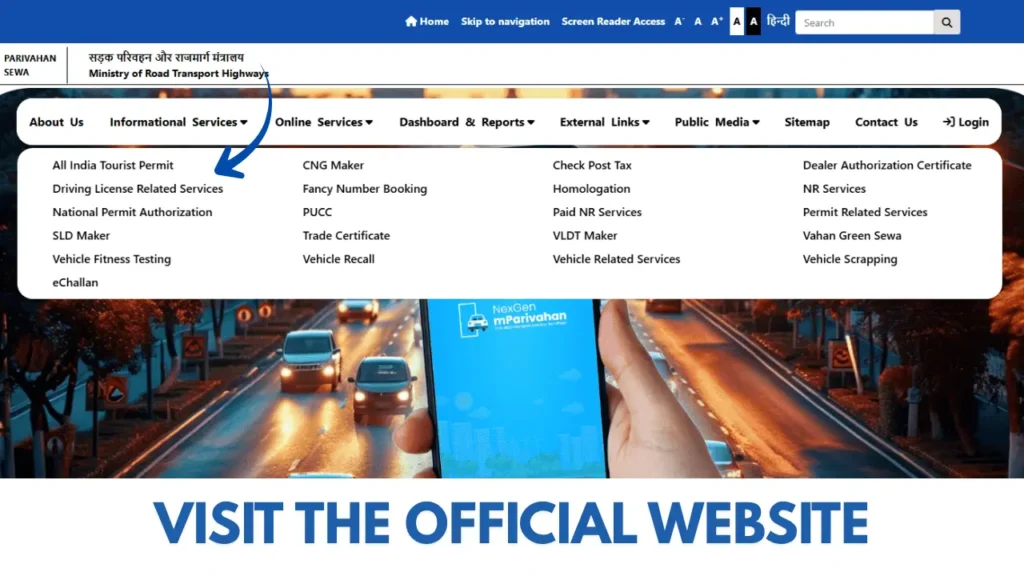
Go to sarathi.parivahan.gov.in and select your State or Union Territory to access the relevant portal.
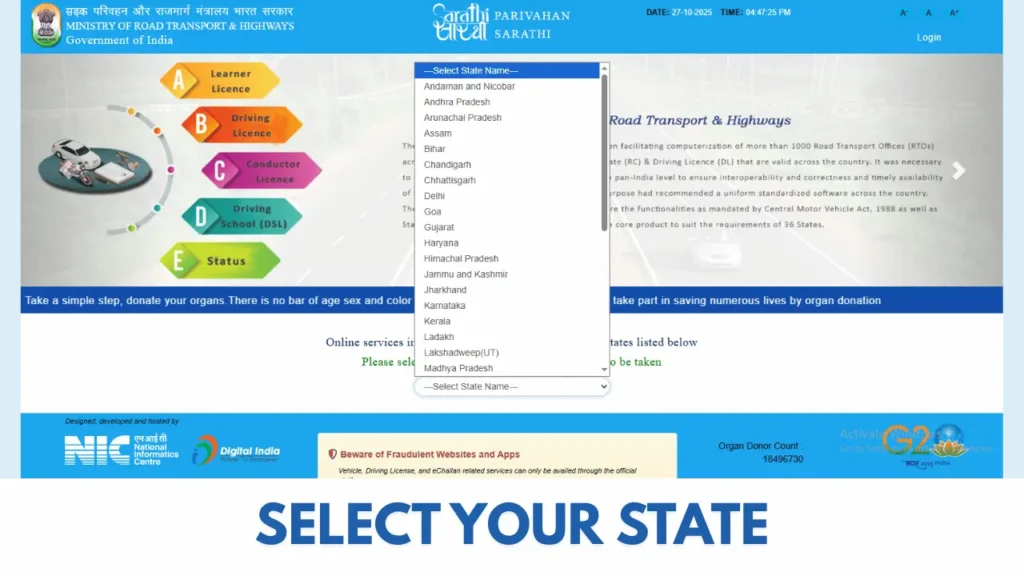
Step 2: Apply for a Learner’s Licence (LL)
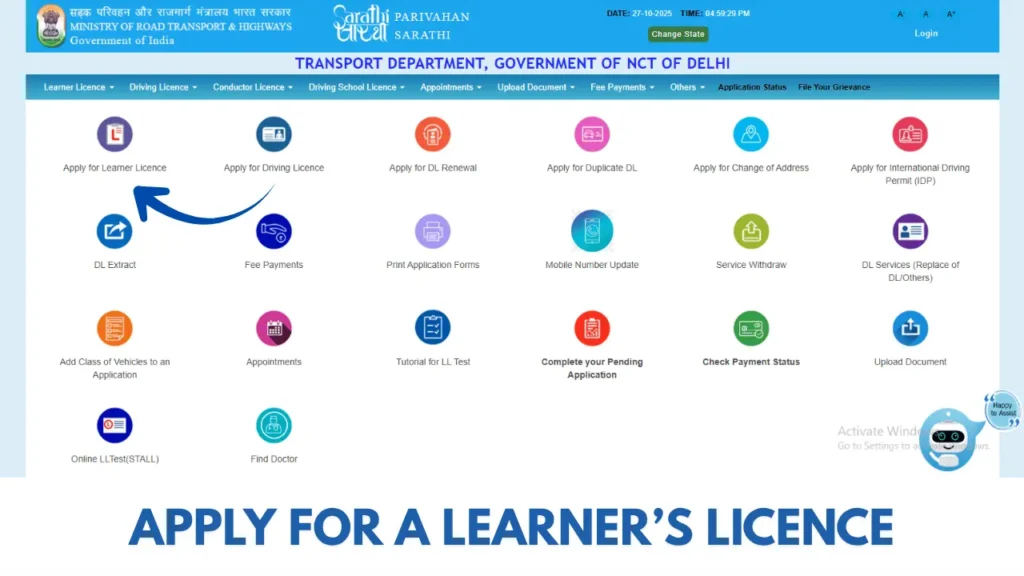
- Click on “Learner’s Licence” and start your online application.
- Fill in your personal and address details.
- Upload the required documents (ID proof, address proof, and photographs).
- Pay the application fee online.
- Schedule and take the online learner’s test if applicable.
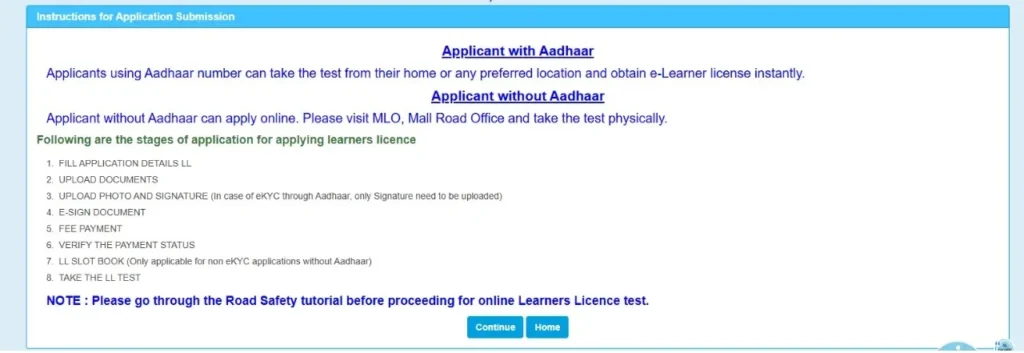
Step 3: Appear for the Learner’s Licence Test
Pass the test (online or at your nearest RTO) to receive your Learner’s Licence (LL), valid for up to 6 months.
Step 4: Practice Driving Safely
Use your LL to practice driving with L-plates under the supervision of a person holding a valid driving licence.
Step 5: Apply for a Permanent Driving Licence (DL)
After the waiting period (usually 30 days from LL issue), log in again and apply for your Permanent Driving Licence. Book your driving test slot at the RTO.
Step 6: Take the Driving Test
On the scheduled day, visit the RTO with your documents and vehicle. Once you clear the practical test, your permanent DL will be approved.
Step 7: Receive and Track Your Licence
You’ll receive your physical or digital Driving Licence (DL) via post, or you can download your e-DL from the Parivahan Sewa portal. Track your application anytime using your reference number.
How to Check Your Driving Licence Application Status
Tracking your driving licence status has never been easier. The Sarathi Parivahan portal allows you to check the progress of your application anytime, from any device — without visiting the RTO.
Follow These Simple Steps:
1. Visit the Official Portal
Open your browser and go to the official Sarathi Parivahan website.
2. Select “Application Status“
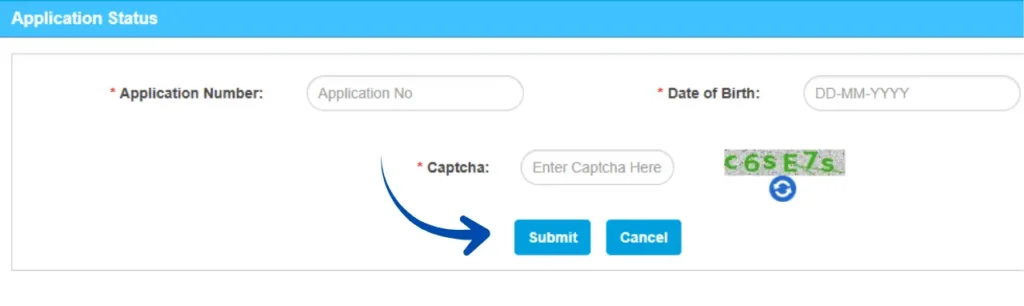
On the homepage, look for the “Application Status” option — usually visible on the main menu.
3. Enter Your Details
- Enter your Application Number.
- Provide your Date of Birth.
- Fill in the Captcha Code to verify you’re a real user.
4. Check Your Status
Click “Submit” or “Check Status.”
You’ll instantly see the current stage of your application — whether it’s under review, approved, dispatched, or delivered.
For a complete breakdown — including what each status message means and what to do if your application seems stuck — see our full Driving Licence Status guide.
Driving Licence Fee Structure (Indicative)
| Service | Fee (INR) |
|---|---|
| Learner’s Licence (LL) | ₹200 |
| Permanent Driving Licence (DL) | ₹200 |
| Driving Licence Renewal | ₹200 |
| Duplicate Driving Licence | ₹250 |
| International Driving Permit (IDP) | ₹1,000 |
| Adding New Vehicle Class to DL | ₹500 |
| Driving Licence Test | ₹300 |
| Late Renewal (after grace period) | ₹300 + applicable fees |
Note: The above fees are indicative and may vary by State or Union Territory. Always check the latest fee structure on the Sarathi Parivahan portal.
Renewing or Getting a Duplicate Driving Licence
If your Driving Licence (DL) is about to expire or has been lost, stolen, or damaged, the Parivahan Sewa Portal makes it easy to renew or request a duplicate — all from the comfort of your home. This online system ensures a hassle-free, transparent, and quick process, without unnecessary RTO visits.
Licence Renewal
A Driving Licence must be renewed periodically to stay valid and legally compliant.
You can apply for renewal up to 30 days before expiry, and the new licence will carry forward your previous validity.
If renewal is done after 30 days, a small late fee applies, and the new validity starts from the date of renewal.
Licences that have been expired for more than 5 years require a fresh application.
Documents Required for Renewal:
- Current (expired) Driving Licence
- Form 2 – Application for Renewal
- Form 1 – Self-declaration of fitness (non-transport vehicles)
- Form 1A – Medical Certificate (for transport licences or applicants over 40)
- Applicable renewal fee and proof of identity
Duplicate Driving Licence
If your licence is lost, misplaced, torn, or unreadable, you can apply for a Duplicate DL online.
This duplicate holds the same validity and details as your original licence and can be used legally for all purposes.
Documents Required for Duplicate DL:
- Application Form (Form 2)
- FIR or Lost Licence Report (if applicable)
- Passport-size photograph
- Self-attested ID and address proof
- Applicable duplicate DL fee
Step-by-Step Process (Common for Both)

- Visit sarathi.parivahan.gov.in and choose your State/UT.
- Select “Driving Licence Services” → Choose Renewal or Duplicate DL.
- Enter your DL number and personal details.
- Upload required documents and pay the fee online.
- Book an appointment (if required for verification/biometrics).
- Track your application status using the acknowledgement number.
- Once approved, download your e-DL or receive the physical card via post.
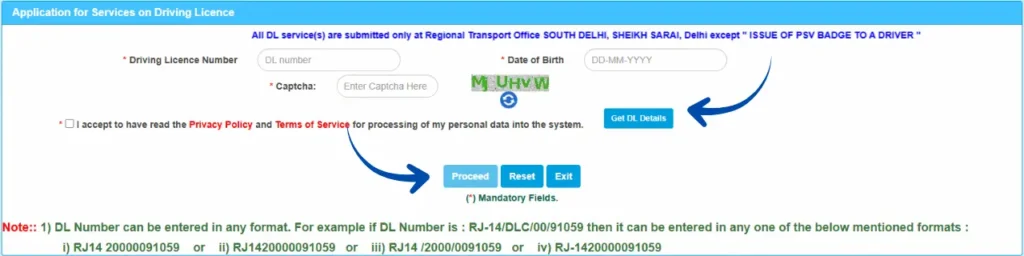
Indicative Fees
| Service Type | Fee (INR) |
|---|---|
| Licence Renewal | ₹200 |
| Duplicate DL | ₹250 |
| Late Renewal (after grace period) | ₹300 + applicable charges |
Quick Tips
- Keep a digital copy (e-DL) saved on your phone via the mParivahan app.
- File an FIR immediately if your DL is lost or stolen before applying for a duplicate.
- Always ensure your personal details match on Aadhaar and your DL record to avoid delays.
Parivahan Sewa: Rc Vehicle Services & e-Challan (VAHAN Portal Guide)
Parivahan Sewa serves as India’s centralized digital transport platform for all vehicle-related services, including registration, ownership transfer, RC renewal, hypothecation updates, and e-Challan payments. This system removes the need to visit RTO offices by allowing users to complete every process online in a fast, transparent, and secure way.
Users who want to manage their vehicle documents online can also download their Registration Certificate (RC) directly through the VAHAN portal without visiting the RTO office.
Accessing Vehicle Services via VAHAN
All vehicle-related operations are managed through the VAHAN portal, integrated under Parivahan Sewa.
Follow these simple steps to get started:
- Visit the official website: www.parivahan.gov.in — the trusted government website offering all vehicle and transport-related online services.
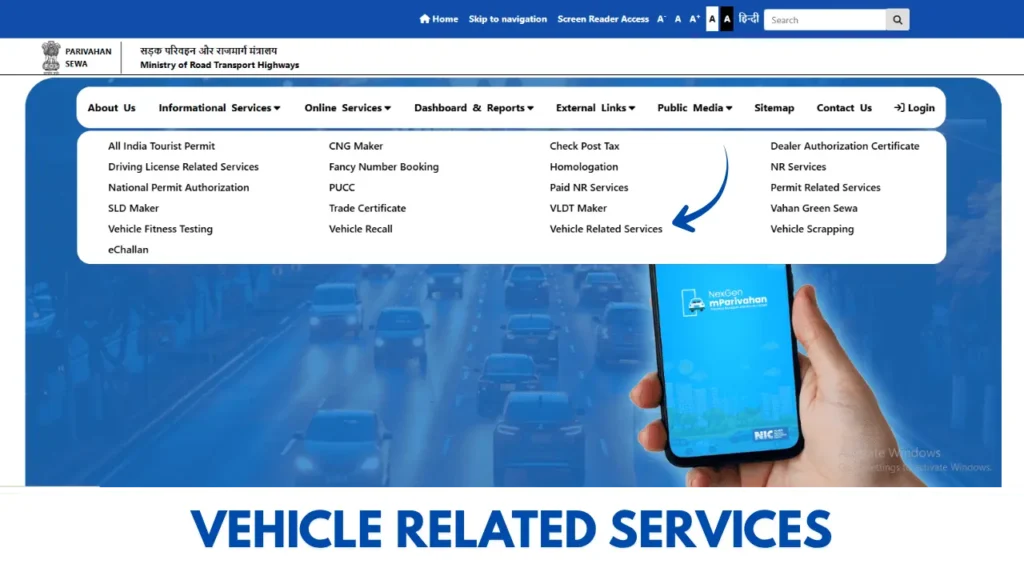
- Click on “Online Services” → “Vehicle Related Services (VAHAN)”
- Select your State/UT and corresponding RTO
- Choose the required service, such as:
- New Vehicle Registration
- Renewal of Registration Certificate (RC)
- Transfer of Ownership
- Duplicate RC
- Address Change
- Add/Remove Hypothecation (loan updates)
- Vehicle Fitness or Permits
- Submit Details and Complete Payment
Fill in the required vehicle details, upload documents, pay the prescribed fee online, and download your digital receipt or acknowledgment instantly.
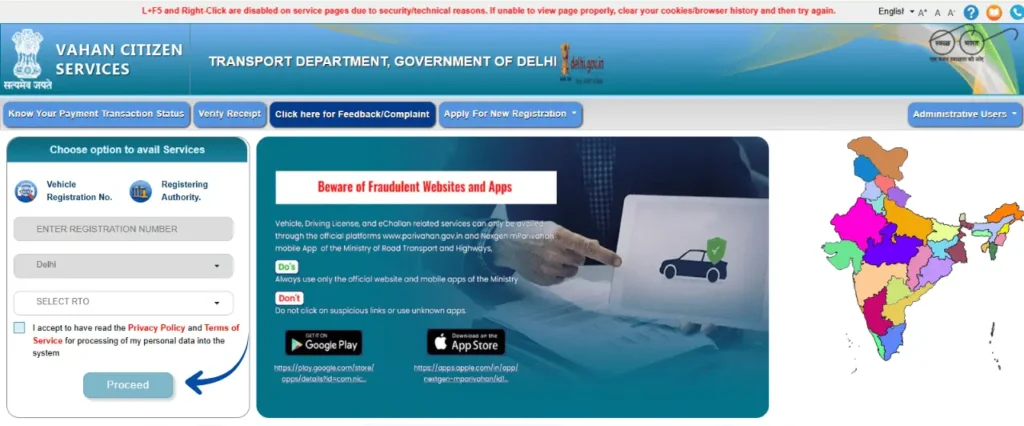
Tip: ou can track all updates, including RC status and application progress, directly from your VAHAN dashboard anytime.
Managing Traffic Violations with e-Challan
The e-Challan online system under Parivahan Sewa helps citizens check, verify, and pay traffic fines online — securely and hassle-free.
How to Check & Pay e-Challan:
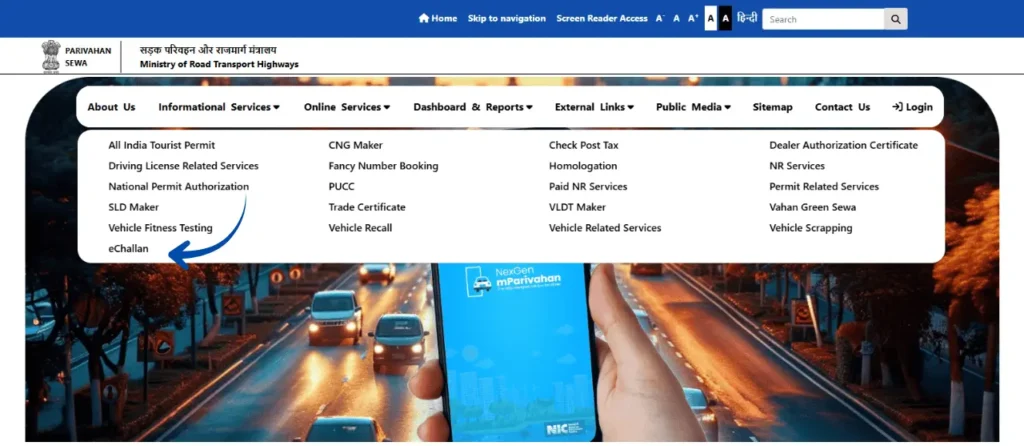
- Go to parivahan.gov.in
- Click “Online Services” → “e-Challan”
- You’ll be redirected to the official eChallan Portal
- Select “Check Challan Status”
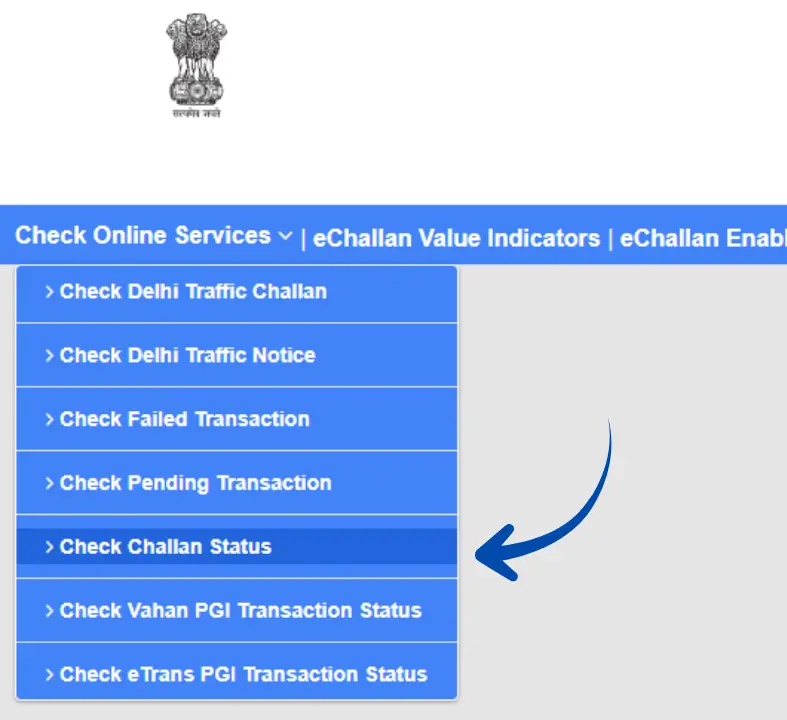
5. Enter your Challan Number, DL Number, or Vehicle Number
6. Click “Get Details” to view pending challans
7. Review and complete payment online through the available options
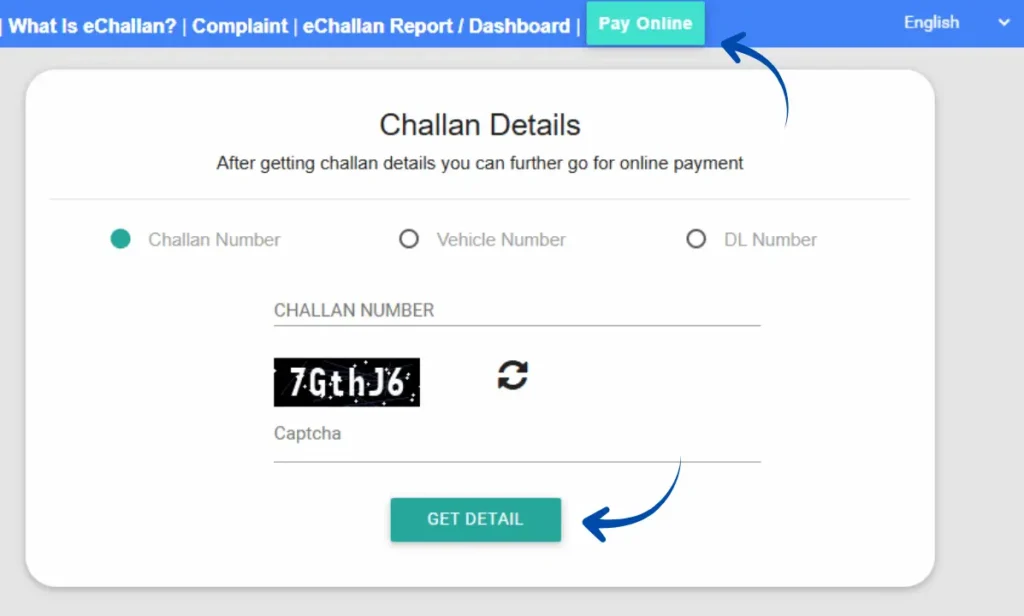
Pro Tip: You can also download digital challan receipts for your records or dispute incorrect fines directly through the portal.
Driving Licence Forms – (Updated 2026)
| Form No. | Description |
|---|---|
| Form 1 | Self-declaration of physical fitness for applicants of non-transport vehicles. |
| Form 1A | Medical certificate to be issued by a registered medical practitioner for transport vehicle applicants or individuals above 40 years. |
| Form 2 | Application form for obtaining or renewing a Learner’s Licence or Driving Licence. |
| Form 3 | Official Learner’s Licence issued to applicants for supervised driving practice. |
| Form 4A | Application form for the grant of a Permanent Driving Licence. |
| Form 5 | Certificate issued by a recognized Motor Driving School confirming driver training completion. |
| Form 8 | Application for adding a new class of vehicle to an existing Driving Licence. |
| Form 9 | Application form for renewal of a Driving Licence. |
Vehicle-Related Forms – (Updated 2026)
| Form No. | Description |
|---|---|
| Form 25 | Application form for the renewal of a vehicle’s Registration Certificate (RC) after expiry. |
| Form 26 | Used to apply for a duplicate Registration Certificate in case the original is lost, stolen, or damaged. |
| Form 28 | No Objection Certificate (NOC) required when transferring a vehicle to another state or region. |
| Form 29 | Notice of vehicle ownership transfer submitted by the current owner to the RTO. |
| Form 30 | Application for the transfer of ownership to the new buyer after sale or inheritance. |
| Form 35 | Form used for the termination of hypothecation, i.e., removing bank/financier loan endorsement after repayment. |
Parivahan Sewa Helpline & Support
Official support channels for licence services, vehicle registration, mParivahan, and eChallan assistance.
| Service Type | Support Contact |
|---|---|
| Vehicle Registration, Tax & Permit Services | helpdesk-vahan@gov.in |
| Driving Licence & Learner Licence Support | helpdesk-sarathi@gov.in |
| mParivahan & Digital Documents | helpdesk-mparivahan@gov.in |
| eChallan & Traffic Violation Services | helpdesk-echallan@gov.in |
| General Helpdesk Support | +91-120-492-5505 |
Common Parivahan Problems & Smart Solutions
Stuck on a Parivahan issue? Here are quick, real fixes for the problems people run into most often.
Payment Failed or Pending
Money deducted but application still showing “Pending”? The payment gateway or treasury server takes time to sync with the Parivahan system.
Quick Solution
- Use “Verify Payment Status” before paying again
- Wait 24–48 hours for automatic reconciliation
- Save your UPI reference or transaction ID safely
Document Upload Error
Seeing “File Not Supported” or upload failure? Wrong file format, large file size, or special characters in the filename are the usual causes.
Quick Solution
- Upload JPG images and PDF documents only
- Keep file size between 10 KB and 200 KB
- Rename files — no spaces or special characters
Aadhaar e-KYC Mismatch
If your Aadhaar name or date of birth doesn’t exactly match the application details, online verification will fail immediately.
Quick Solution
- Match spelling and spacing to your Aadhaar exactly
- Update Aadhaar details before applying
- Use offline verification if e-KYC keeps failing
Driving Test Slot Not Available
“No Slots Available” is one of the most common Sarathi portal issues, especially during peak hours and high-traffic periods.
Quick Solution
- Check availability early morning at 8–9 AM
- Use a desktop browser for smoother booking
- Try selecting a nearby RTO for faster slots
mParivahan App Issues
Blank RC details, login loops, or missing digital DL usually happen due to app cache problems or outdated records in the system.
Quick Solution
- Clear app cache and log in again
- Delete and re-add your Virtual RC or DL card
- Turn off VPN — it causes loading errors
e-Challan Still Active After Payment
Paid your traffic fine but challan still showing? Database sync can take a few hours to reflect after payment is processed.
Quick Solution
- Refresh challan details manually after a few hours
- Wait for payment confirmation from the system
- Download and save your payment receipt right away
FAQs About Parivahan Sewa
Final Thoughts:
Parivahan Sewa has transformed how India manages vehicle and driving licence services—no more long queues or paperwork delays. From applying for a new licence to renewing your RC, paying eChallans, or updating ownership details, everything can be handled online with just a few clicks.
To stay updated and ensure smooth processing, always use the official website parivahan.gov.in and follow the instructions shown for your state.
Bookmark this page for quick access to verified Parivahan forms, direct links, and guides to all essential RTO services.
Manage your vehicle registration, driving licence, and e-Challan anytime, anywhere — with Parivahan Sewa, every RTO service is just a click away. Stay safe and drive smart!